
Centralized configuration storages
Examples on GitHub: centralized_config
Tarantool enables you to store a cluster's configuration in one reliable place using a Tarantool or etcd-based storage:
- A Tarantool-based configuration storage is a replica set that stores a cluster's configuration in synchronous spaces.
- etcd is a distributed key-value storage for any type of critical data used by distributed systems.
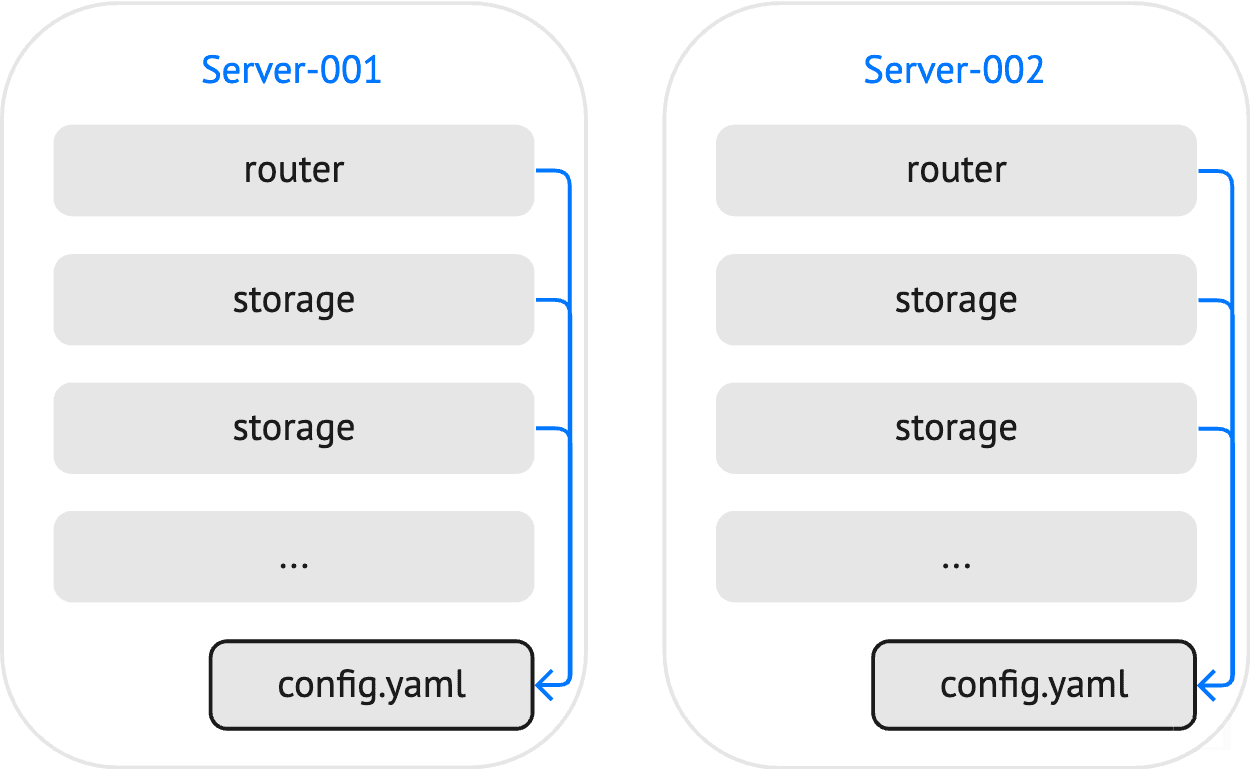
With a local YAML configuration, you need to make sure that all cluster instances use identical configuration files:
Using a centralized configuration storage, all instances get the actual configuration from one place:
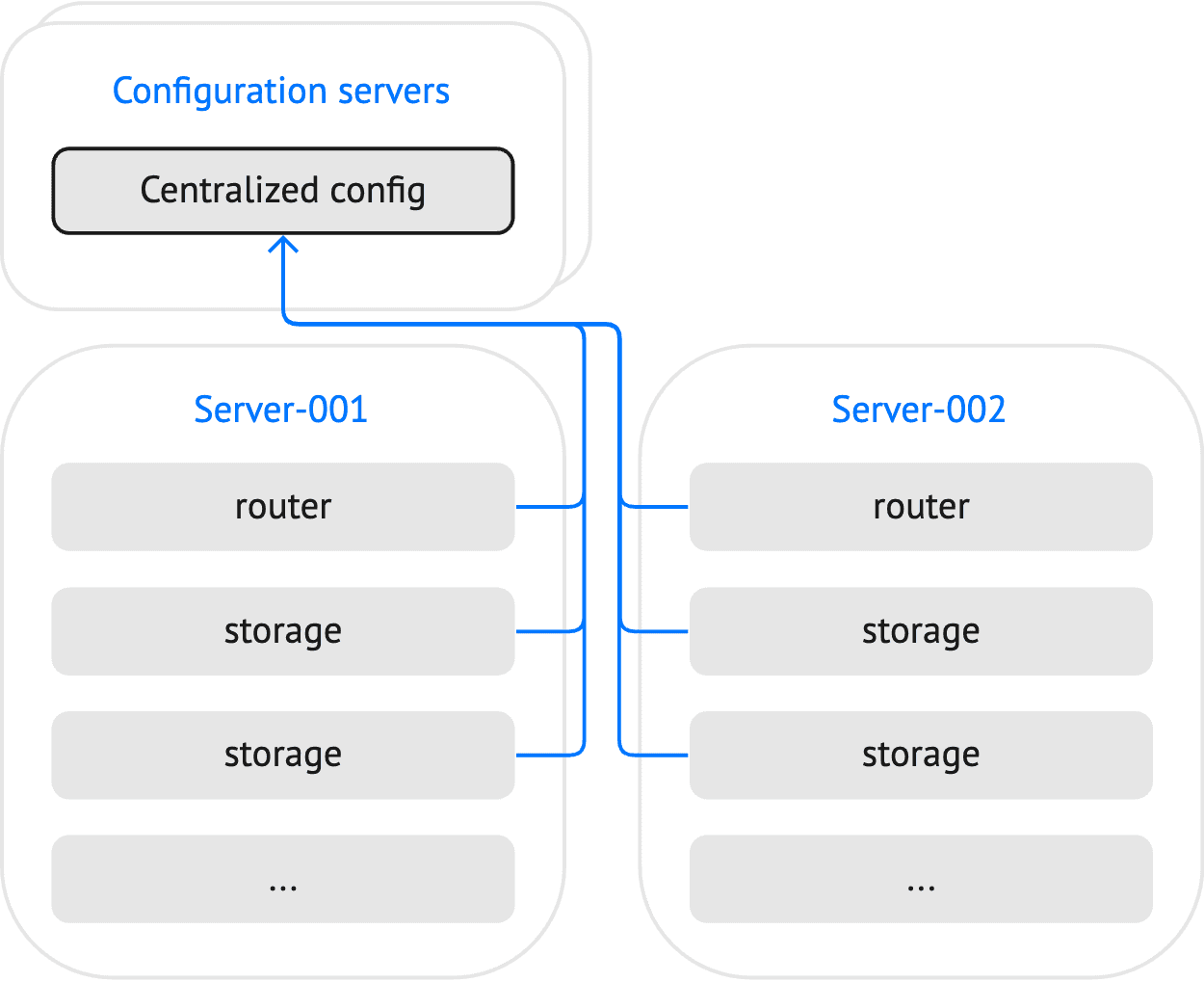
This topic describes how to set up a configuration storage, publish a cluster configuration to this storage, and use this configuration for all cluster instances.
To make a replica set act as a configuration storage, use the built-in
config.storage role.
To configure a Tarantool-based storage, follow the steps below:
-
Define a replica set topology and specify the following options at the replica set level:
groups:group001:replicasets:replicaset001:roles: [ config.storage ]roles_cfg:config.storage:status_check_interval: 3instances:instance001:iproto:listen:- uri: '127.0.0.1:4401'instance002:iproto:listen:- uri: '127.0.0.1:4402'instance003:iproto:listen:- uri: '127.0.0.1:4403'
-
Create a user and grant them the following privileges:
- The
readandwritepermissions to theconfig_storageandconfig_storage_metaspaces used to store configuration data. - The
executepermission touniverseto allow interacting with the storage using the tt utility.
- The
credentials:users:sampleuser:password: '123456'privileges:- permissions: [ read, write ]spaces: [ config_storage, config_storage_meta ]- permissions: [ execute ]universe: true
- Set the
replication.failover
option to
electionto enable automated failover:
replication:failover: election
- Enable the MVCC transaction mode to provide linearizability of read operations:
database:use_mvcc_engine: true
The resulting storage configuration might look as follows:
credentials:users:sampleuser:password: '123456'privileges:- permissions: [ read, write ]spaces: [ config_storage, config_storage_meta ]- permissions: [ execute ]universe: truereplicator:password: 'topsecret'roles: [ replication ]iproto:advertise:peer:login: replicatorreplication:failover: electiondatabase:use_mvcc_engine: truegroups:group001:replicasets:replicaset001:roles: [ config.storage ]roles_cfg:config.storage:status_check_interval: 3instances:instance001:iproto:listen:- uri: '127.0.0.1:4401'instance002:iproto:listen:- uri: '127.0.0.1:4402'instance003:iproto:listen:- uri: '127.0.0.1:4403'
You can find the full example here: tarantool_config_storage.
To start instances of the configured storage, use the tt start
command, for example:
$ tt start tarantool_config_storage
Learn more from the Starting and stopping instances section.
To learn how to set up an etcd-based configuration storage, consult the etcd documentation.
The example script below demonstrates how to use the etcdctl utility
to create a user that has read and write access to configurations stored
by the /myapp/ prefix:
etcdctl user add root:topsecretetcdctl role add myapp_config_manageretcdctl role grant-permission myapp_config_manager --prefix=true readwrite /myapp/etcdctl user add sampleuser:123456etcdctl user grant-role sampleuser myapp_config_manageretcdctl auth enable
The credentials of this user should be specified when configuring a connection to the etcd cluster.
The tt utility provides the tt cluster command for
managing centralized cluster configurations. The tt cluster publish
command can be used to publish a cluster's configuration to both
Tarantool and etcd-based storages.
The example below shows how a tt environment and
a layout of the
application called myapp might look:
├── tt.yaml├── source.yaml└── instances.enabled└── myapp├── config.yaml└── instances.yml
tt.yaml: a tt configuration file.source.yamlcontains a cluster's configuration to be published.config.yamlcontains a local configuration used to connect to the centralized storage.instances.ymlspecifies instances to run in the current environment. The configured instances are used by tt when starting a cluster.tt cluster publishignores this configuration file.
To publish a cluster's configuration (source.yaml) to a centralized
storage, execute tt cluster publish as follows:
$ tt cluster publish "http://sampleuser:123456@localhost:2379/myapp" source.yaml
Executing this command publishes a cluster configuration by the
/myapp/config/all path.
The config module provides the API for interacting with
a Tarantool-based configuration storage. The example below shows how to
read a configuration stored in the source.yaml file using
the fio module API and put this configuration by the
/myapp/config/all path:
local fio = require('fio')local cluster_config_handle = fio.open('../../source.yaml')local cluster_config = cluster_config_handle:read()local response = config.storage.put('/myapp/config/all', cluster_config)cluster_config_handle:close()
Learn more from the config_storage_api_reference section.
To publish a cluster's configuration to etcd using the etcdctl
utility, use the put command:
$ etcdctl put /myapp/config/all < source.yaml
To use a configuration from a centralized storage for your cluster, you need to provide connection settings in a local configuration file.
Connection options for a Tarantool-based storage should be specified in the config.storage section of the configuration file. In the example below, the following options are specified:
config:storage:endpoints:- uri: '127.0.0.1:4401'login: sampleuserpassword: '123456'- uri: '127.0.0.1:4402'login: sampleuserpassword: '123456'- uri: '127.0.0.1:4403'login: sampleuserpassword: '123456'prefix: /myapptimeout: 3reconnect_after: 5
endpointsspecifies the list of configuration storage endpoints.prefixsets a key prefix used to search a configuration. Tarantool searches keys by the following path:<prefix>/config/*. Note that<prefix>should start with a slash (/).timeoutspecifies the interval (in seconds) to perform the status check of a configuration storage.reconnect_afterspecifies how much time to wait (in seconds) before reconnecting to a configuration storage.
You can find the full example here: config_storage.
Connection options for etcd should be specified in the config.etcd section of the configuration file. In the example below, the following options are specified:
config:etcd:endpoints:- http://localhost:2379prefix: /myappusername: sampleuserpassword: '123456'http:request:timeout: 3
config:etcd:endpoints:- http://localhost:2379prefix: /myapp
config:etcd:endpoints:- http://localhost:2379prefix: /myappusername: sampleuserpassword: '123456'
endpointsspecifies the list of etcd endpoints.prefixsets a key prefix used to search a configuration. Tarantool searches keys by the following path:<prefix>/config/*. Note that<prefix>should start with a slash (/).usernameandpasswordspecify credentials used for authentication.http.request.timeoutconfigures a request timeout for an etcd server.
You can find the full example here: config_etcd.
The tt utility is the recommended way to start Tarantool instances. You can learn how to do this from the Starting and stopping instances section.
You can also use the tarantool command to start a Tarantool instance.
In this case, you can eliminate creating a local configuration and
provide connection settings using the following environment variables:
- Tarantool-based storage:
TT_CONFIG_STORAGE_ENDPOINTSandTT_CONFIG_STORAGE_PREFIX. - etcd-based storage:
TT_CONFIG_ETCD_ENDPOINTSandTT_CONFIG_ETCD_PREFIX.
The example below shows how to provide etcd connection settings and
start cluster instances using the tarantool command:
$ export TT_CONFIG_ETCD_ENDPOINTS=http://localhost:2379$ export TT_CONFIG_ETCD_PREFIX=/myapp$ tarantool --name instance001$ tarantool --name instance002$ tarantool --name instance003
By default, Tarantool watches keys with the specified prefix for
changes in a cluster's configuration and reloads a changed configuration automatically. If necessary, you can set
the config.reload option
to manual to turn off configuration reloading:
config:reload: 'manual'etcd:# ...
In this case, you can reload a configuration in an admin console or
application code using
the reload() function
provided by the config module:
require('config'):reload()