
Application environment
This section provides a high-level overview on how to prepare a Tarantool application for deployment and how the application's environment and layout might look. This information is helpful for understanding how to administer Tarantool instances using tt CLI in both development and production environments.
The main steps of creating and preparing the application for deployment are:
- Initializing a local environment.
- Creating and developing an application.
- Packaging the application.
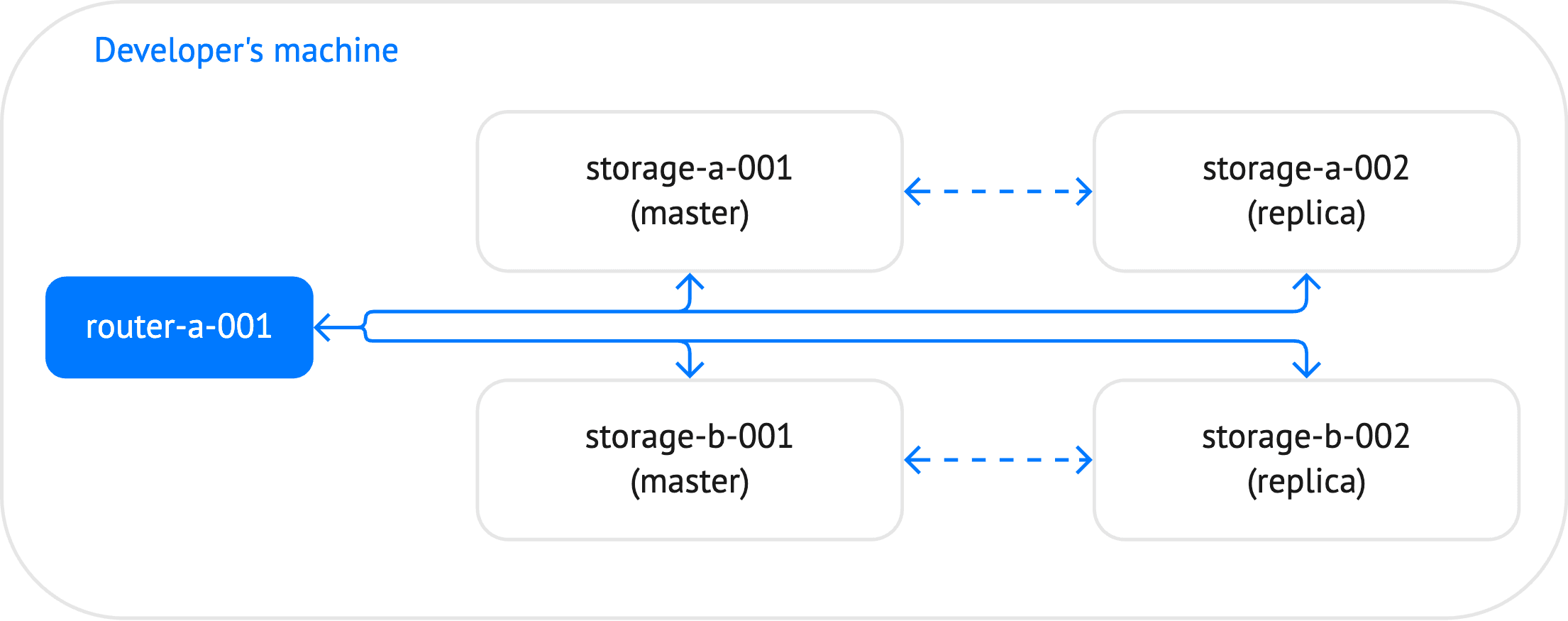
In this section, a sharded_cluster_crud application is used as an example. This cluster includes 5 instances: one router and 4 storages, which constitute two replica sets.
Before creating an application, you need to set up a local environment
for tt:
-
Create a home directory for the environment.
-
Run
tt initin this directory:~/myapp$ tt init• Environment config is written to 'tt.yaml'
This command creates a default tt configuration file tt.yaml for a
local environment and the directories for applications, control sockets,
logs, and other artifacts:
~/myapp$ lsbin distfiles include instances.enabled modules templates tt.yaml
Find detailed information about the tt configuration parameters and
launch modes on the tt configuration page.
You can create an application in two ways:
- Manually by preparing its layout in a directory inside
instances_enabled. The directory name is used as the application identifier. - From a template by using the tt create command.
In this example, the application's layout is prepared manually and looks as follows.
~/myapp$ tree.├── bin├── distfiles├── include├── instances.enabled│ └── sharded_cluster_crud│ ├── config.yaml│ ├── instances.yaml│ ├── router.lua│ ├── sharded_cluster_crud-scm-1.rockspec│ └── storage.lua├── modules├── templates└── tt.yaml
The sharded_cluster_crud directory contains the following files:
config.yaml: contains the configuration of the cluster. This file might include the entire cluster topology or provide connection settings to a centralized configuration storage.instances.yaml: specifies instances to run in the current environment. For example, on the developer's machine, this file might include all the instances defined in the cluster configuration. In the production environment, this file includes instances to run on the specific machine.router.lua: includes code specific for a router.sharded_cluster_crud-scm-1.rockspec: specifies the required external dependencies (for example,vshardandcrud).storage.lua: includes code specific for storages.
You can find the full example here: sharded_cluster_crud.
To package the ready application, use the tt pack command.
This command can create an installable DEB/RPM package or generate
.tgz archive.
The structure below reflects the content of the packed .tgz archive
for the
sharded_cluster_crud
application:
~/myapp$ tree -a.├── bin│ ├── tarantool│ └── tt├── instances.enabled│ └── sharded_cluster_crud -> ../sharded_cluster_crud├── sharded_cluster_crud│ ├── .rocks│ │ └── share│ │ └── ...│ ├── config.yaml│ ├── instances.yaml│ ├── router.lua│ └── storage.lua└── tt.yaml
The application's layout looks similar to the one defined when developing the application with some differences:
bin: contains thetarantoolandttbinaries packed with the application bundle.instances.enabled: contains a symlink to the packedsharded_cluster_crudapplication.sharded_cluster_crud: a packed application. In addition to files created during the application development, includes the.rocksdirectory containing application dependencies (for example,vshardandcrud).tt.yaml: attconfiguration file.
When deploying a distributed cluster application from a
.tar.gz archive, you can define instances to run on each
machine by changing the content of the instances.yaml file.
-
On the developer's machine, this file might include all the instances defined in the cluster configuration.
instances.yaml:
storage-a-001:storage-a-002:storage-b-001:storage-b-002:router-a-001:
-
In the production environment, this file includes instances to run on the specific machine.
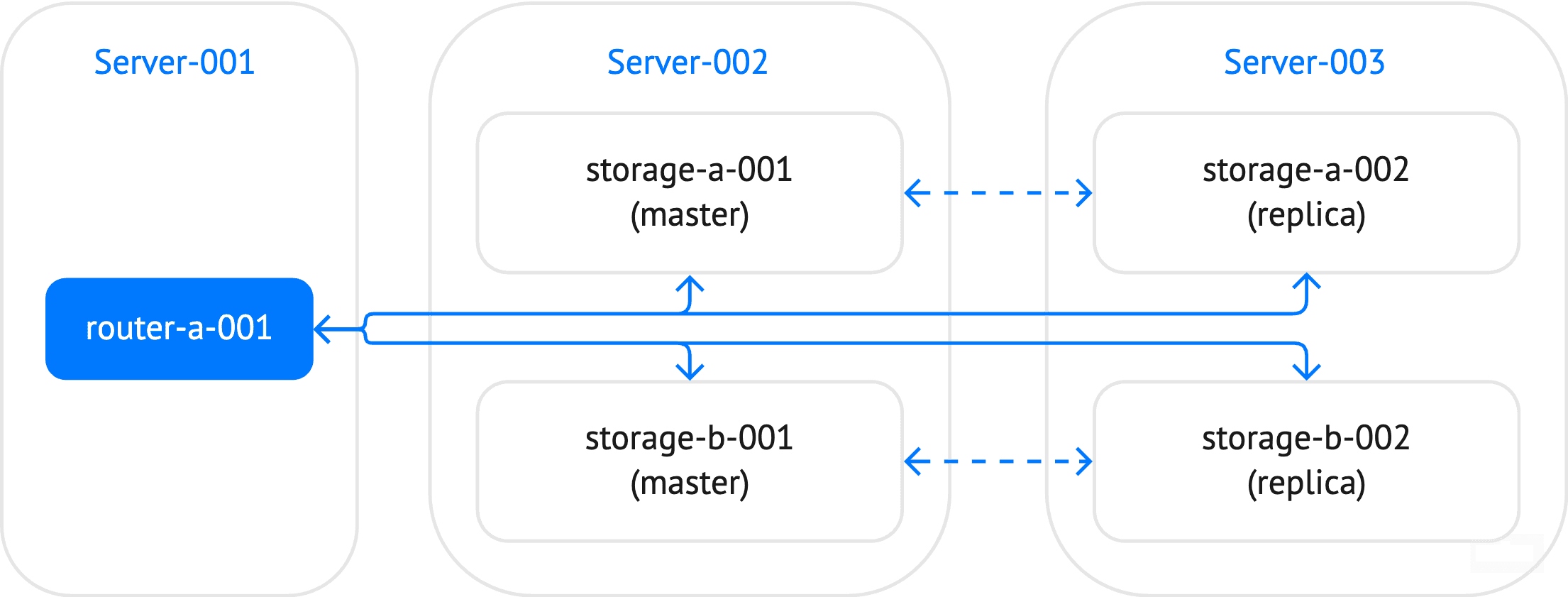
instances.yaml(Server-001):router-a-001:instances.yaml(Server-002):storage-a-001:storage-b-001:instances.yaml(Server-003):storage-a-002:storage-b-002:
The Starting and stopping instances section describes how to start and stop Tarantool instances.
Tarantool applications installed from DEB and RPM packages built with
tt pack can run as systemd services. They run on behalf of
the tarantool system user. It is created automatically during the
package installation.
By default, the application artifacts are placed in the following directories:
/var/lib/tarantool/sys_env– application data/var/log/tarantool/sys_env– logs/var/run/tarantool/sys_env– runtime artifacts
If you want to change these directories, make sure that the tarantool
user has enough permissions on the directories you use.